
Connecting the head unit
The recommended start without removing the dash is to install CommunityPack Market from a USB stick via the engineering menu (StageLight is installed with it). For PC modules you can then enable ADB Wi‑Fi in StageLight, or use a jumper.
Important. Everything you do with the car is at your own risk. Follow the steps carefully. Community Pack is not responsible for possible consequences.
Before you start, make sure the head unit is running Flyme Auto 1.8.0–1.8.1 (or a compatible version from the pack notes) — see “About system” in the car settings.
Recommended: CommunityPack Market from a USB stick
CommunityPack Market and StageLight are installed on the head unit. A PC is not required for this step.
Works on Geely Coolray L / Binyue L, Coolray G and Belgee X50+ (the archive has a folder for each car).
Download packages
Removal only uninstalls Market from system; the license directory and already installed apps stay.
Current app list — on the Market page.
What you need
- USB stick formatted as FAT32
- Market install archive
Install
- Download the archive and prepare the stick (FAT32 preferred; FAT32/exFAT are accepted).
- From the archive take the folder for your car and put it in the root of the stick (the first level must be a folder like
3C5625_…/3C5024_…/3C6325_…). You can copy all three. - Folder mapping:
3C5024_SW0SX11_coolray_l— Coolray L / Binyue L3C5625_SW0SX11_coolray_g— Coolray G3C6325_SW0SX11_x50_plus— Belgee X50+
- Plug the stick into the left USB port of the head unit and make sure a “USB…” toast flashes.
- Start the car and open the engineering menu:
the second engineering menu is opened with#*+ (month + 10) + day + hours (12-hour clock).
Developer example: 06 Feb 2024 20:00 →#*120608. - Tap “U盘升级” (update from U-disk).
- Wait for the progress bar and the “GOTOVO” message.
- Press and hold the right stalk on the steering wheel until the head unit reboots.
- Open CommunityPack Market. If the device has PRO on the server, a PRO badge appears in the top-right corner.
- Need the PC installer over the network — open StageLight (it is installed from USB together with Market), enable ADB Wi‑Fi, then choose “By IP” in the installer.
Alternative: dash removal and ADB jumper
If USB Market is not an option — classic USB-cable connection with a jumper on the service connector.
What you need (jumper)
- TORX (hex) keys for the head-unit bolts
- Plastic clip removers (optional — for a cleaner trim removal)
- NShVI 1.0 ferrule (or equivalent) to jumper pins 5 and 6
- USB 2.0 AM–AM cable, preferably short (~0.5 m)
- A Windows laptop and the Community Pack installer
1. Removing the decorative trim
- Gently pry the plastic trim behind the display from the screen side with clip removers or a plastic spatula.
- Unclip the fasteners around the edge — the trim comes off without force; do not yank it.
2. Accessing the connector on the HU
- Undo the three bolts that hold the head unit (TORX).
- Carefully lift the HU out of its slots with a small upward pull. Watch the windshield.
- Make sure the back of the unit matches your trim (service connector highlighted in red). On cars before ~Oct 2025 the blue wire may differ
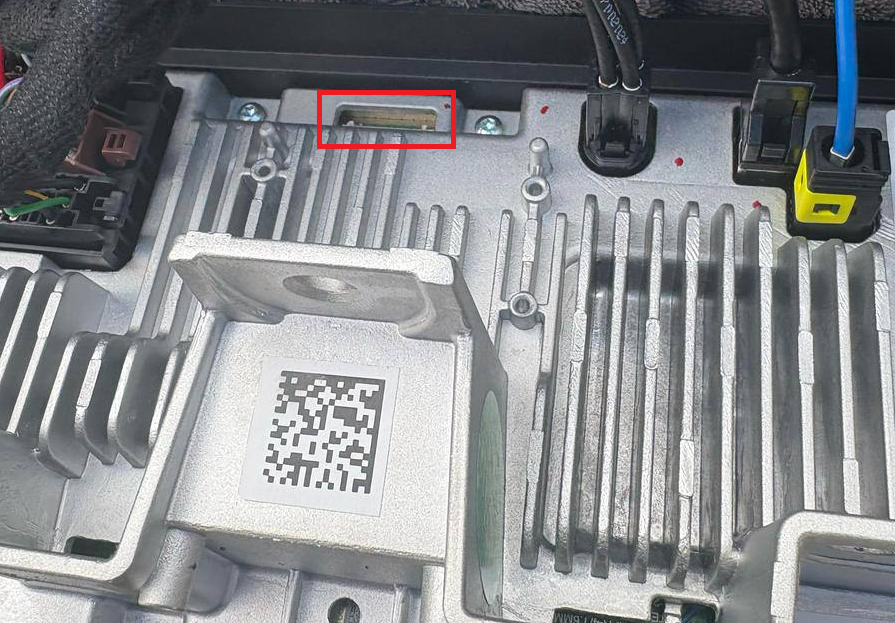
3. Jumper for ADB mode
- Fit the jumper (NShVI ferrule) on pins 5 and 6 of the service connector — see the photo.
- Without the jumper the laptop will not see the HU in USB debug mode.
- Alternative: a ready JST MX 1.25 cable with those pins jumped (see discussions on 4PDA).
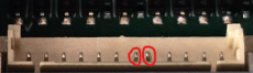
4. Connecting the laptop
- Connect the USB 2.0 AM–AM cable to the car’s left USB port (closer to the driver) and to the laptop.
- Reboot the HU with a long press of the right volume rocker on the steering wheel.
- After reboot do not launch anything on the HU screen — open the Community Pack installer on the laptop and tap “Connect”.
- If the HU asks “Allow USB debugging” — confirm.
5. Wi‑Fi connection after the jumper
If Sunray is installed, you can stop using the jumper: PC and HU on the same Wi‑Fi, enable “Wireless ADB” in Sunray, then choose “By IP” in the installer (port 5555).
You may need to reboot the HU after enabling “Wireless ADB”. If it still does not connect, try removing the jumper.
After you are done (jumper method)
- To connect later without the jumper, install Market from USB (StageLight comes with it) and enable ADB Wi‑Fi
- Remove the jumper from pins 5–6. If you leave it, USB sticks in the car will not be readable.
- Seat the HU, tighten the bolts and put the decorative trim back.
Possible issues
- On X50+ the install also replaces modified system apps and clears their cache. The UI language may reset to Chinese. Don’t panic: open the car’s stock settings → Display → system language at the bottom, then pick Russian (or English).
- The stick is not detected in “U盘升级” — check FAT32/exFAT, the left USB port, and that the car folder is in the stick root (not nested).
PRO benefits — installer modules, HU apps, Market and Morphius cloud.
4PDA thread: “Geely Coolray L Community Pack”
Telegram group: “Geely Coolray L”
More photos and a first-hand install story: “Ура, теперь я русская” on Drive2 (Anastasia, Geely Binyue L).
The same help is in the installer: “?” / “Help” in the connection window.